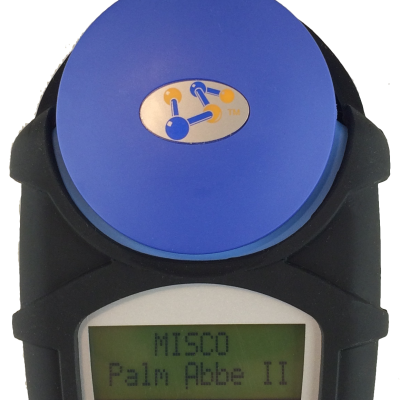
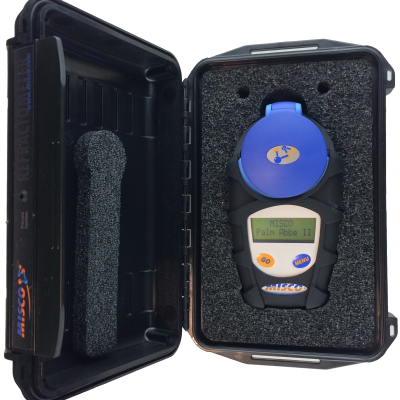
Palm Abbe Digital Refractometer 202x

$495.00

Description

The Palm Abbe CG-202x digital refractometer is a big step up from the CG-201. It features a greatly expanded range and two scales to read both Brix and refractive index. It also features a large dual-line LCD display.

Unit of Measure: Brix & Refractive Index Range: 0.0 to 85.0 Brix: 1.3330 to 1.5040 nD Resolution: 0.1 Brix 0.0001 nD Precision: +/- 0.1 Brix +/- 0.0001 nD Well Material: Stainless Steel Prism Material: Sapphire Temp. Comp. Range: 0 to 50’C (32 to 122’F) Temp. Comp. Basis: Sucrose Min. Sample Volume ~0.3 ml Measuring Time: ~5 Seconds Power Supply: 2 X AAA Battery Life: 4000+ Readings Dimensions: 145 x 75 x 37 mm (5.7 x 2.95 x 1.46 in.) Net Weight: 250 grams (8.8 Oz.) Display Language: English Only Display: 2 Line x 12 Characters Body Color: Light Blue
1. Apply Sample. Open the evaporation cover on the front of the refractometer. Inspect the measuring surface to make sure that it is clean and dry and that there is no residue left over from a previous test. Place a few drops of water, preferably same water source used with fluid you are measuring, on the measuring surface. Make sure that the water is evenly distributed and covers the entire measuring surface, and then close the evaporation cover. 2. WAIT. In order for the refractometer’s temperature compensation to work properly, and to obtain the most accurate possible zero-set, the refractometer temperature, the water temperature, and the ambient temperature should all be in equilibrium. The relative thermal mass of the water is small when compared with the thermal mass of the refractometer so it will generally come to the temperature of the refractometer rather quickly, providing there is not a very large temperature difference. 3. Power On. If the Palm Abbe is not already on, then press and release the button to turn it on. 4. Select Zero-Set. Press and release the

button until you see “Set Zero? – [GO] to Set” displayed on the LCD display and then press and release the button. 5. Check Display. If the calibration was successful, the display will read “Ready.” If the calibration was not successful, then the display will display an error message. Press and release the button to trigger a reading. In a few seconds a reading will be displayed on the LCD display using the default (last used) scale. The value displayed should be the value for water in that unit of measure. If the default scale does not have a water equivalent then you will receive a “SAMPLE OUT OF RANGE -” message. 6. Clean Refractometer. Clean and dry the refractometer measuring surface.
1. Power On. If the Palm Abbe is not already on, then press and release the button to turn it on. If this is the first time you are using the refractometer for the day, if you have just moved between areas with large temperature differences, or if you do not have personal knowledge of its zero-set, then you should zero-set the refractometer before beginning. 2. Select your Scale. The Palm Abbe digital refractometer is equipped with from one to five scales depending on the model. A scale represents a specific unit of measure for a specific fluid. For instance, a unit of measure could be percent by volume, percent by weight, specific gravity, density, molar concentration, freeze point, boil point, etc. You can select a scale by pressing and releasing the

button until you see the scale and unit of measure displayed on the LCD display. 3. Apply Sample. Opening the evaporation cover on the front of the refractometer will reveal the sample well. Inspect the measuring surface to make sure that it is clean and dry, and that there is not any residue left over from previous tests. It may be necessary to use rubbing alcohol with a cotton swab in order to remove certain types of residue. Once clean, place a few drops of sample on the measuring surface using a disposable pipette, making sure that the fluid is evenly distributed and covers the entire measuring surface, and then close the evaporation cover. Disposable pipettes will prevent cross contamination between samples. 4. WAIT. In order for the refractometer’s temperature compensation to work properly, and to obtain the most accurate possible readings, the refractometer temperature, the sample temperature, and the ambient temperature should all be in equilibrium. The relative thermal mass of the fluid is small when compared with the thermal mass of the refractometer so it will generally come to the temperature of the refractometer rather quickly, providing there is not a very large temperature difference. Not waiting for the temperature to equalize is the most common error people make. A good rule of thumb is to wait at least thirty seconds for every 20 °F (10 °C) difference in temperature between the fluid and the instrument. You will have to allow more time for fluids above 50 °C and for thick viscous fluids. 5. Take Reading. Press and release the button to trigger a reading. In a few seconds your reading will be displayed on the LCD display. It is good practice to take five readings in a row and mentally average the results. If the results are drifting in one direction then the temperature probably is not stable. 6. Clean Refractometer. When your test is complete, you can use the original disposable pipette to remove the sample and properly discard it. Make sure the measuring surface is clean and dry for the next test. As previously noted, it may be necessary to use rubbing alcohol with a cotton swab in order to remove certain types of residue. A clean sample well is critical to ensure accurate readings.

Reviews

There are no reviews yet.

Be the first to review “Palm Abbe Digital Refractometer 202x”